
IndexTTS2情感合成API本地部署
发布日期:2025/11/8 11:54:45 浏览量:
IndexTTS2情感合成API本地部署
1. 情感合成技术痛点与解决方案
1.1 行业痛点分析
当前工业级文本转语音(Text-To-Speech, TTS)系统在情感可控性与合成效率上面临双重挑战:
情感单一化:传统TTS模型生成的语音缺乏情感层次,难以满足游戏配音、有声小说等场景需求
实时性不足:高表现力模型通常需要GPU支持,边缘设备部署困难
多模态控制复杂:情感参数调节依赖专业知识,普通开发者难以快速上手
1.2 IndexTTS2核心突破
IndexTTS2作为工业级可控高效零样本TTS系统,通过创新架构解决上述问题:
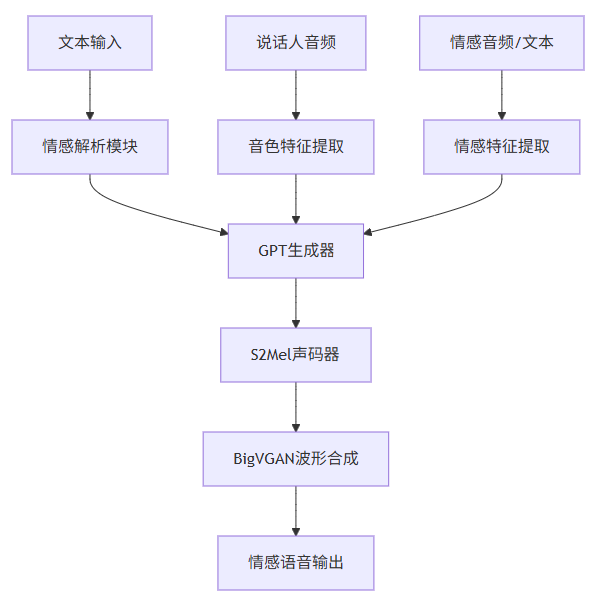
情感-说话人特征解耦:实现音色与情感的独立控制,支持多模态情感输入
双生成模式:精确时长控制(用于影视配音)与自然韵律生成(用于日常对话)
轻量化部署:FP16推理模式下显存占用降低50%,支持消费级GPU实时合成
2. 本地环境部署与配置
2.1 硬件要求
设备类型 最低配置 推荐配置
CPU 4核8线程 8核16线程
GPU 6GB显存 12GB显存 (NVIDIA RTX 3060+)
内存 16GB 32GB
存储 20GB空闲空间 SSD 50GB空闲空间
2.2 环境搭建步骤
2.2.1 仓库克隆与依赖安装
# 克隆代码仓库
git clone https://gitcode.com/gh_mirrors/in/index-tts
cd index-tts
# 安装uv包管理器
pip install -U uv
# 使用国内镜像安装依赖
uv sync --all-extras --default-index "https://mirrors.aliyun.com/pypi/simple"
2.2.2 模型权重下载
# 设置国内HF镜像export HF_ENDPOINT="https://hf-mirror.com"
# 下载模型权重
uv tool install "huggingface_hub[cli]"
hf download IndexTeam/IndexTTS-2 --local-dir=checkpoints
2.2.3 环境验证
# 检查GPU加速是否正常PYTHONPATH="$PYTHONPATH:." uv run tools/gpu_check.py
成功输出示例:
>> CUDA available: True
>> GPU device: NVIDIA GeForce RTX 4090 (24GB)
>> PyTorch version: 2.1.0+cu121
>> 环境检查通过,可以开始使用IndexTTS2
3. 情感合成API核心功能解析
3.1 API架构概览
IndexTTS2提供多层次API接口,满足不同开发需求:
高级接口:infer()方法封装完整流程,一行代码实现情感合成
中级接口:分离文本处理、特征提取、语音合成等模块
低级接口:直接调用GPT生成器、声码器等核心组件
3.2 情感控制模态详解
3.2.1 音频情感迁移
通过参考音频提取情感特征,实现情感风格迁移:
from indextts.infer_v2 import IndexTTS2
# 初始化引擎
tts = IndexTTS2(
cfg_path="checkpoints/config.yaml",
model_dir="checkpoints",
use_fp16=True, # 启用FP16推理节省显存
use_cuda_kernel=True # 使用CUDA加速内核
)
# 基础情感合成
tts.infer(
spk_audio_prompt=’examples/voice_07.wav’, # 说话人参考音频
text="生命就像一盒巧克力,结果往往出人意料。",
output_path="emo_transfer.wav",
emo_audio_prompt="examples/emo_sad.wav", # 情感参考音频
emo_alpha=0.8 # 情感强度 (0.0-1.0)
)
3.2.2 文本情感解析
通过文本描述直接生成对应情感语音:
# 文本引导情感合成tts.infer(
spk_audio_prompt=’examples/voice_12.wav’,
text="快躲起来!是他要来了!",
output_path="text_guided_emo.wav",
use_emo_text=True,
emo_text="表现出极度恐惧和紧张的情绪", # 情感描述文本
emo_alpha=0.6 # 平衡情感强度与语音自然度
)
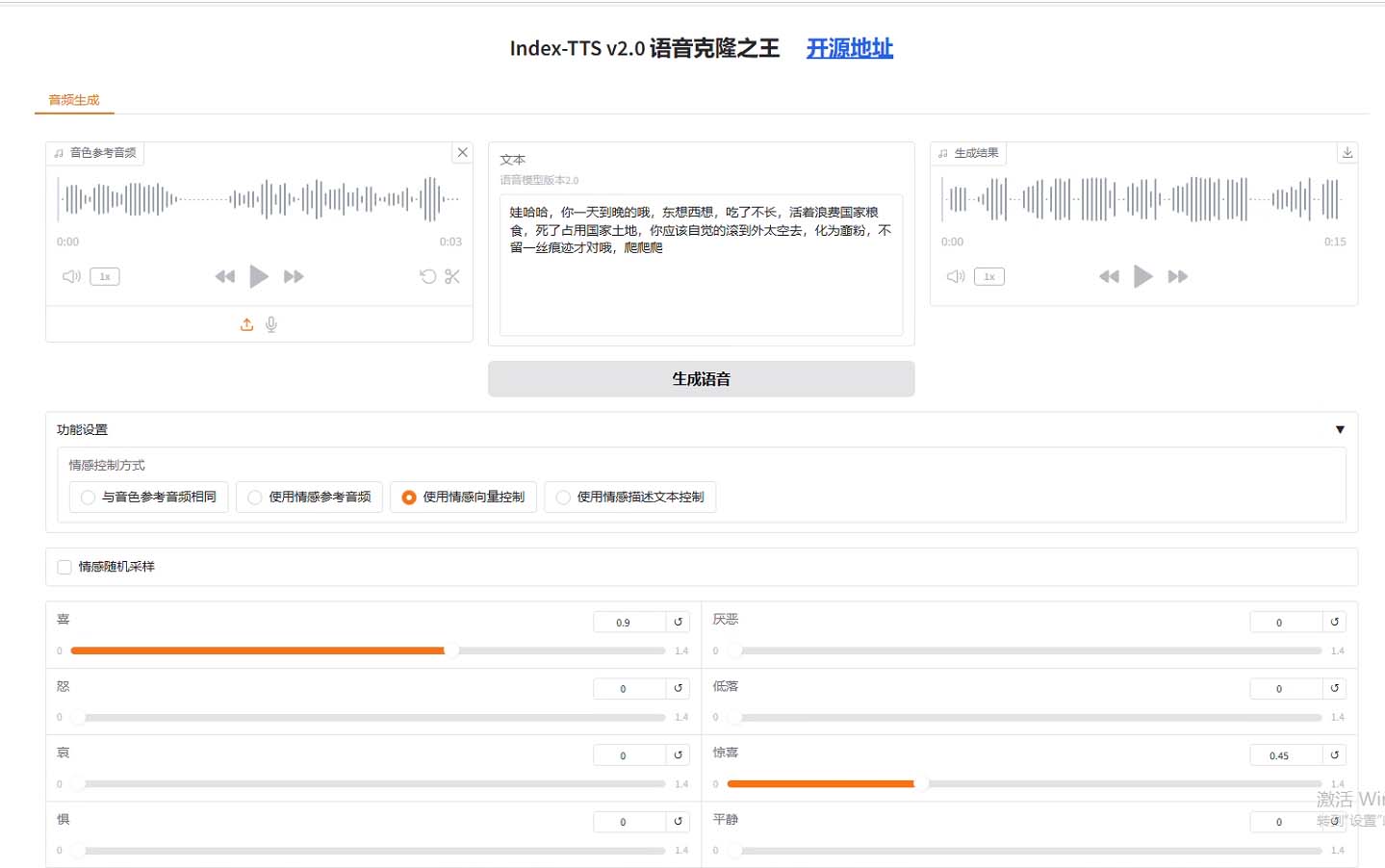
3.2.3 情感向量精确控制
# 情感向量定义:[高兴, 愤怒, 悲伤, 恐惧, 反感, 忧郁, 惊讶, 平静]tts.infer(
spk_audio_prompt=’examples/voice_10.wav’,
text="哇塞!这个爆率也太高了!",
output_path="vector_controlled_emo.wav",
emo_vector=[0, 0, 0, 0, 0, 0, 0.85, 0.15], # 高惊讶度,低平静度
use_random=False # 禁用随机采样,确保结果可复现
)
3.3 性能优化参数
参数 作用 推荐值
use_fp16 启用半精度推理 True (GPU) / False (CPU)
use_deepspeed 启用DeepSpeed优化 显存<10GB时启用
max_text_tokens_per_segment 文本分段长度 120 (平衡速度与连贯性)
interval_silence 段间静音时长(ms) 200 (自然停顿)
4. 高级功能与实际应用
4.1 批量情感合成
针对有声小说等大规模合成需求,实现高效批量处理:
import os
from tqdm import tqdm
# 批量处理文本文件
def batch_synthesize(tts, text_file, output_dir, spk_prompt, emo_prompt):
os.makedirs(output_dir, exist_ok=True)
with open(text_file, ’r’, encoding=’utf-8’) as f:
lines = [line.strip() for line in f if line.strip()]
for i, text in enumerate(tqdm(lines)):
output_path = os.path.join(output_dir, f"chapter_{i+1}.wav")
tts.infer(
spk_audio_prompt=spk_prompt,
text=text,
output_path=output_path,
emo_audio_prompt=emo_prompt,
emo_alpha=0.75,
verbose=False # 关闭单条日志
)
# 使用示例
batch_synthesize(
tts=tts,
text_file="novel_chapters.txt",
output_dir="novel_audio",
spk_prompt="examples/voice_03.wav",
emo_prompt="examples/emo_hate.wav"
)
4.2 情感强度动态调节
通过emo_alpha参数实现情感渐变效果:
def generate_emotional_transition(tts, output_dir):os.makedirs(output_dir, exist_ok=True)
base_text = "今天天气不错,适合出去走走。"
spk_prompt = "examples/voice_01.wav"
happy_prompt = "examples/emo_happy.wav"
sad_prompt = "examples/emo_sad.wav"
# 生成从悲伤到高兴的情感过渡
for i, alpha in enumerate([0.0, 0.2, 0.4, 0.6, 0.8, 1.0]):
output_path = os.path.join(output_dir, f"transition_{i}.wav")
tts.infer(
spk_audio_prompt=spk_prompt,
text=base_text,
output_path=output_path,
emo_audio_prompt=happy_prompt if alpha > 0.5 else sad_prompt,
emo_alpha=alpha if alpha > 0.5 else 1-alpha
)
API服务封装
使用FastAPI构建情感合成API服务:
from fastapi import FastAPI, File, UploadFilefrom fastapi.responses import FileResponse
from indextts.infer_v2 import IndexTTS2
import tempfile
import os
app = FastAPI(title="IndexTTS2情感合成API")
# 初始化TTS引擎(全局单例)
tts = IndexTTS2(
cfg_path="checkpoints/config.yaml",
model_dir="checkpoints",
use_fp16=True,
use_cuda_kernel=True
)
@app.post("/synthesize")
async def synthesize(
text: str,
spk_audio: UploadFile = File(...),
emo_audio: UploadFile = None,
emo_alpha: float = 1.0
):
# 保存上传的音频文件
with tempfile.NamedTemporaryFile(suffix=".wav", delete=False) as spk_temp:
spk_temp.write(await spk_audio.read())
spk_path = spk_temp.name
emo_path = None
if emo_audio:
with tempfile.NamedTemporaryFile(suffix=".wav", delete=False) as emo_temp:
emo_temp.write(await emo_audio.read())
emo_path = emo_temp.name
# 生成情感语音
with tempfile.NamedTemporaryFile(suffix=".wav", delete=False) as out_temp:
output_path = out_temp.name
tts.infer(
spk_audio_prompt=spk_path,
text=text,
output_path=output_path,
emo_audio_prompt=emo_path,
emo_alpha=emo_alpha
)
# 清理临时文件
os.unlink(spk_path)
if emo_path:
os.unlink(emo_path)
return FileResponse(output_path, filename="emotional_speech.wav")
if __name__ == "__main__":
import uvicorn
uvicorn.run(app, host="0.0.0.0", port=8000)
性能优化策略
优化方法 实现方式 性能提升
请求批处理 将短文本请求合并处理 吞吐量提升2-3倍
模型量化 使用INT8量化GPT模块 显存占用减少40%
KV缓存 复用说话人特征缓存 响应时间减少30%
异步处理 使用Celery处理长文本 并发能力提升5倍
6. 常见问题与解决方案
6.1 安装问题
错误现象 可能原因 解决方法
uv: command not found uv未添加到PATH 重新登录终端或执行source ~/.bashrc
依赖安装超时 网络连接问题 切换其他国内镜像源
CUDA版本不匹配 PyTorch与系统CUDA版本冲突 安装对应CUDA版本的PyTorch
6.2.2 情感效果不明显
检查情感参考音频质量,确保情感特征明显
调整emo_alpha参数(建议范围0.6-0.9)
尝试更长的情感参考音频(3-5秒最佳)
6.3 性能优化
推理速度慢:启用DeepSpeed和CUDA内核
语音不连贯:调整interval_silence参数(默认200ms)
生成语音过长:设置max_mel_tokens限制生成长度
 业务实施流程
 马上咨询: 如果您有业务方面的问题或者需求,欢迎您咨询!我们带来的不仅仅是技术,还有行业经验积累。
QQ: 39764417/308460098 Phone: 13 9800 1 9844 / 135 6887 9550 联系人:石先生/雷先生