
小智AI完整的MCP交互流程
发布日期:2025/11/5 14:21:31 浏览量:
1. 初始化阶段 - 设备与AI服务器建立连接
// ESP32设备启动时 void Application::Initialize() { // ...其他初始化 #if CONFIG_IOT_PROTOCOL_MCP McpServer::GetInstance().AddCommonTools(); // 注册MCP工具 #endif // 建立与小智AI的连接 protocol_->Connect(); // WebSocket连接到小智AI }
连接建立过程:
ESP32设备 → 小智AI服务器
WebSocket连接: wss://api.xiaozhi.me/mcp/device/{device_id}
2. 工具注册阶段 - AI获取设备能力
当连接建立后,小智AI会查询设备的MCP工具列表:
AI服务器发送工具列表请求:
{ "jsonrpc": "2.0", "id": 1, "method": "tools/list", "params": {} }
ESP32设备响应(基于mcp_server.cc):
// 在McpServer::HandleRequest中处理 void McpServer::HandleRequest(const std::string& request) {
    cJSON* json = cJSON_Parse(request.c_str()); auto method = cJSON_GetObjectItem(json, "method"); if (strcmp(method->valuestring, "tools/list") == 0) { // 返回工具列表 cJSON* response = cJSON_CreateObject();
        cJSON* result = cJSON_CreateObject();
        cJSON* tools = cJSON_CreateArray(); // 添加音量控制工具 cJSON* volume_tool = cJSON_CreateObject(); cJSON_AddStringToObject(volume_tool, "name", "self.audio_speaker.set_volume"); cJSON_AddStringToObject(volume_tool, "description", "Set the volume of the audio speaker. If the current volume is unknown, you must call `self.get_device_status` tool first and then call this tool."); // 添加工具参数schema cJSON* input_schema = cJSON_CreateObject(); cJSON_AddStringToObject(input_schema, "type", "object");
        cJSON* properties = cJSON_CreateObject();
        cJSON* volume_prop = cJSON_CreateObject(); cJSON_AddStringToObject(volume_prop, "type", "integer"); cJSON_AddNumberToObject(volume_prop, "minimum", 0); cJSON_AddNumberToObject(volume_prop, "maximum", 100); cJSON_AddItemToObject(properties, "volume", volume_prop); cJSON_AddItemToObject(input_schema, "properties", properties); cJSON_AddItemToObject(volume_tool, "inputSchema", input_schema); cJSON_AddItemToArray(tools, volume_tool); // 添加更多工具... cJSON_AddItemToObject(result, "tools", tools); cJSON_AddItemToObject(response, "result", result); // 发送响应 char* response_str = cJSON_Print(response);
        protocol_->SendMCPResponse(response_str); free(response_str); cJSON_Delete(response);
    } cJSON_Delete(json);
}
设备返回的工具列表:
{ "jsonrpc": "2.0", "id": 1, "result": { "tools": [
      { "name": "self.get_device_status", "description": "Provides the real-time information of the device...", "inputSchema": {"type": "object", "properties": {}}
      },
      { "name": "self.audio_speaker.set_volume", "description": "Set the volume of the audio speaker...", "inputSchema": { "type": "object", "properties": { "volume": {"type": "integer", "minimum": 0, "maximum": 100}
          }, "required": ["volume"]
        }
      }
    ]
  }
}
3. 用户语音输入阶段
用户说话: “把音量调到80”
↓
ESP32麦克风采集 → 音频处理 → Opus编码 → 发送到小智AI
↓
小智AI: 语音识别(ASR) → “把音量调到80”
4. AI理解和工具调用决策
小智AI模型分析用户意图:
输入: "把音量调到80" AI分析: - 意图: 音量控制 - 参数: 音量值=80 - 选择工具: self.audio_speaker.set_volume - 生成参数: {"volume": 80}
5. AI发送工具调用请求
{ "jsonrpc": "2.0", "id": 2, "method": "tools/call", "params": { "name": "self.audio_speaker.set_volume", "arguments": { "volume": 80 } }
6. ESP32设备执行工具调用
// 在McpServer::HandleRequest中处理工具调用 void McpServer::HandleRequest(const std::string& request) {
    cJSON* json = cJSON_Parse(request.c_str()); auto method = cJSON_GetObjectItem(json, "method"); if (strcmp(method->valuestring, "tools/call") == 0) { auto params = cJSON_GetObjectItem(json, "params"); auto tool_name = cJSON_GetObjectItem(params, "name"); auto arguments = cJSON_GetObjectItem(params, "arguments"); if (strcmp(tool_name->valuestring, "self.audio_speaker.set_volume") == 0) { // 执行音量设置 auto volume = cJSON_GetObjectItem(arguments, "volume"); int volume_value = volume->valueint; // 调用实际的音量控制 auto& board = Board::GetInstance(); auto codec = board.GetAudioCodec();
            codec->SetOutputVolume(volume_value); // 显示通知(如果有显示屏) auto display = board.GetDisplay(); if (display) {
                display->ShowNotification("音量: " + std::to_string(volume_value));
            } // 构造成功响应 cJSON* response = cJSON_CreateObject();
            cJSON* result = cJSON_CreateObject(); cJSON_AddBoolToObject(result, "success", true); cJSON_AddNumberToObject(result, "volume", volume_value); cJSON_AddStringToObject(result, "message", "音量设置成功"); cJSON_AddItemToObject(response, "result", result); // 发送响应 char* response_str = cJSON_Print(response);
            protocol_->SendMCPResponse(response_str); free(response_str); cJSON_Delete(response);
        }
    } cJSON_Delete(json);
}
7. 设备返回执行结果
{ "jsonrpc": "2.0", "id": 2, "result": { "success": true, "volume": 80, "message": "音量设置成功" } }
8. AI生成语音回复
小智AI根据执行结果生成回复:
工具执行结果: {“success”: true, “volume”: 80, “message”: “音量设置成功”}
AI生成回复: “好的,已将音量调整到80”
TTS合成: 文字 → 语音
发送音频: 语音数据 → ESP32设备
9. 设备播放AI回复
// ESP32接收并播放AI回复 void Application::OnIncomingAudio(AudioStreamPacket&& packet) { std::lock_guard<std::mutex> lock(mutex_); if (device_state_ == kDeviceStateSpeaking &&
        audio_decode_queue_.size() < MAX_AUDIO_PACKETS_IN_QUEUE) {
        audio_decode_queue_.emplace_back(std::move(packet));
    }
} // 音频解码和播放 void Application::OnAudioOutput() { if (!audio_decode_queue_.empty()) { auto packet = std::move(audio_decode_queue_.front());
        audio_decode_queue_.pop_front(); // Opus解码 std::vector<int16_t> pcm_data;
        opus_decoder_->Decode(packet.payload, pcm_data); // 播放音频 auto codec = Board::GetInstance().GetAudioCodec();
        codec->WriteOutput(pcm_data);
    }
}
完整时序图
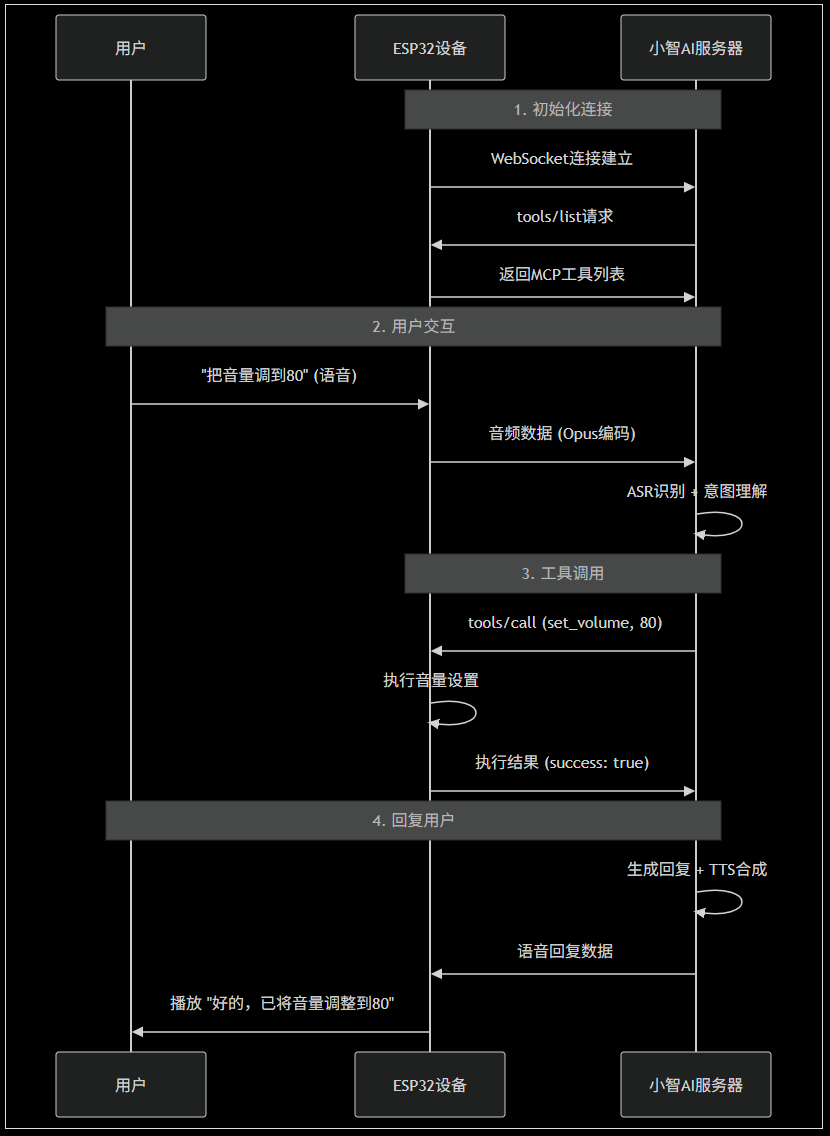
关键实现细节
A. 协议层实现
// 在protocol实现中处理MCP消息 class Protocol { public: void SendMCPResponse(const std::string& response) { // 通过WebSocket发送MCP响应 websocket_->send(response);
    } void OnMCPRequest(const std::string& request) { // 将MCP请求转发给McpServer处理 McpServer::GetInstance().HandleRequest(request);
    }
};
B. 异步处理
// MCP请求的异步处理 void McpServer::HandleRequest(const std::string& request) { // 在后台任务中处理,避免阻塞主线程 background_task_->Schedule([this, request]() { ProcessMCPRequest(request);
    });
}
C. 错误处理
// 工具调用错误处理 if (tool_execution_failed) {
    cJSON* error_response = cJSON_CreateObject();
    cJSON* error = cJSON_CreateObject();
    cJSON_AddNumberToObject(error, "code", -1);
    cJSON_AddStringToObject(error, "message", "Tool execution failed");
    cJSON_AddItemToObject(error_response, "error", error); char* response_str = cJSON_Print(error_response);
    protocol_->SendMCPResponse(response_str);
    free(response_str);
    cJSON_Delete(error_response);
}
性能特点
延迟分析:
- 语音识别: ~200-500ms
- AI理解决策: ~100-300ms
- MCP工具调用: ~10-50ms (本地执行)
- TTS合成: ~200-400ms
- 总延迟: ~500-1250ms
对比外部MCP服务器方案:
- 额外网络往返: +100-200ms
- 服务器处理: +50-100ms
- 本地MCP优势: 节省150-300ms延迟
这就是ESP32本地MCP实现的完整流程
 业务实施流程
 马上咨询: 如果您有业务方面的问题或者需求,欢迎您咨询!我们带来的不仅仅是技术,还有行业经验积累。
QQ: 39764417/308460098 Phone: 13 9800 1 9844 / 135 6887 9550 联系人:石先生/雷先生